On Friday the Field Tech Day delegates of the Gestalt IT event paid a visit to Cisco where they were treated on a very good session on the VCE Vblock. This session was brought to us by “the other” Scott Lowe and Ed Saipetch. Apart from doing a very good presentation they also showed they could fight like lions against the comments of the delegates, resulting in the best session of this Tech Field Day – Boston 2010. Although Vblock is a great piece of machinery the feeling amongst the delegates was almost unanimous about Vblock being very hard to sell and offer little extra value over a self-built configuration using the same components. Writing this blog post took me quite some time reading several guides to better understand the Vblock and during this investigation I changed my mind on whether Vblock is a good or bad idea several times. I hope the following helps you make up your mind.
Vblock, what is it?
Let me explain a bit more on what the Vblock really is, actually it’s fairly simple: the Vblock is a complete Virtual Infrastructure package built on EMC Clariion CX4 series or the EMC Symmetrix V-Max for the storage layer, connected over Cisco Nexus 1000V and Cisco Multilayer Directional Switches (MDS) to a Cisco Unified Computing Systems (UCS) blade center running VMware vSphere 4 . By using a fixed combination of components VCE (a consortium of VMware, Cisco and EMC) is able to guarantee performance, capacity and availability SLA for a known number of virtual machines.
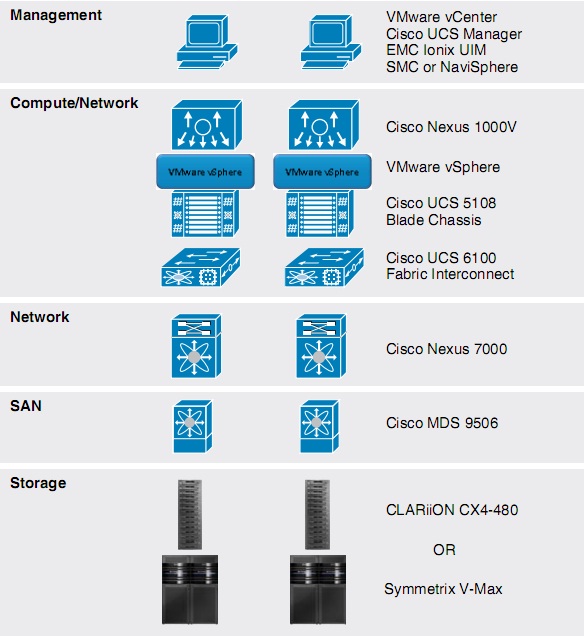
(The Cisco Nexus 7000 in the diagram is not a Vblock component. EMC Ionix is optional and available at additional cost.)
The unique selling points of a Vblock according to VCE are:
- Pretested
- Fully Integrated
- Ready to Go
- Ready to Grow
Vblock Type 1 and Vblock type 2
A Vblock comes in two flavors, type 1 and type 2. Scott Lowe did mention that a type 0 is being constructed at this moment but specs have not been made available yet. When asking my good friend Google, he (or she) told me to expect the smaller type 0 in summer 2010, but that is all unconfirmed info.
A type 1 Vblock will be able to host up to a 1000 VMs and a type 2 Vblock will host up to 2000 VMs. If you hit the limits of a Vblock you just extend your Vblock with another Vblock, which can be of any type (1 or 2). All these Vblocks together can be managed as one. When deciding on what size of Vblock you need it is important to NOT think about RAM, CPU cycles or IOPS needed, but only think of number of VMs you want to run (more not this later) and buy Vblocks accordingly.
No upgrades
Now I do see your head frown on “Buy another Vblock if I hit the limits? Can’t I just upgrade a Vblock with more memory for example?†Well, technically you can; you could add more blades or add more memory to your blades but then it isn’t a Vblock anymore and you lose your one point of support. You don’t lose all support of course, since each component still has full support by either EMC, Cisco or VMware, but the VCE consortium just won’t be able to support you anymore. There are only very limited changes you’re allowed to make to the system to stay within the supported configuration.
This wouldn’t be that much of an issue if resources would have been used to their max, but the maximum values for the UCS Vblock blades are not even near their hardware limits when looking at the Vblock 1 config. Have a look at the exact specs according to the “Vblock Infrastructure Packages Reference Architecture†guide:
| Â | # of VMs based on minimum UCS configuration (16 blades) | # of VMs based on maximum UCS configuration (32 blades) |
| Vblock 1 | 2 chassis, each 6 blades of 48 GB RAM per blade plus 2 blades of 96 GB RAM per blade | 4 chassis, each 6 blades of 48 GB RAM per blade plus 2 blades of 96 GB RAM per blade |
| 1:4 core to VM ratio (1920 MB memory per VM) | 512 | 1024 |
| 1:16 core to VM ratio ( 480MB memory per VM) | 2048 | 4096 |
| Total RAM | 480 GB RAM | 1920 GB RAM |
| Â | Â | Â |
| Vblock2 | 4 chassis, each 8 blades with 96 GB RAM per blade | 8 chassis, each 8 blades with 96 GB RAM per blade |
| 1:4 core to VM ratio (1920 MB memory per VM) | 1024 | 2048 |
| 1:16 core to VM ratio ( 480MB memory per VM) | 4096 | 8192 |
| Total RAM | 3072 GB RAM | 7144 GB RAM |
A UCS B-200 M1 blade can hold 96GB RAM according to the specs but will only be filled to half their maximum possible configuration in a type 1 Vblock which always uses 6 blades per chassis at only half of their possible configuration max plus 2 blades maxed out at 96 GB RAM. Why not max out those first 6 blades as well? If I start with the minimum config of 2 chassis of each 8 blades (6+2), a ratio of 1:4 VMs per core, would max out at 512 VMs (32 VMs per blade). Now when I go over those 512 VMs, according to the Vblock principle I would need to add another chassis. Such a chassis would then give me 256 VMs extra. However, when working with 96GB blades instead of the 48GB blades, I could run up to 768 VMs on the first to chassis but this is no longer a supported configuration.
The balance
This is where the balanced design of the Vblock comes into play. According VCE the supported configurations guarantee there is always a good balance between CPU, RAM and IOPS. An increase RAM will enable you to run more VMs but will also ask for more CPU cycles and demand more IOPS from your storage system. With a Vblock each type or combination of types will always make sure this balance remains intact. Sounds good. The Vblock’s fixed configuration will protect you from creating a bottleneck when changing a configuration.
The bottleneck
What I don’t understand though is where the bottleneck is in a Vblock type 1 to use only 48GB? When starting with 2 chassis there is plenty of memory that could be added before adding a 3rd chassis. CPU shouldn’t be the problem, since the Vblock type 2 blades are the same B-200 blades, all running 96GB RAM and are able to host more VMs per blade than the Vblock type 1.  Would storage be the bottleneck? Actually, I doubt that, since adding a 3rd or 4th chassis would put more VMs on the storage and ask more IOPS from the storage, which the Vblock can deliver according to the specs. Then why would the balance be gone when adding more memory? I have no answer on that, I can only say that where 4 chassis with each 6x 48GB + 2x 96GB blades will give me 1920GB RAM, a non-supported config with 3 chassis of 8x 96GB blades would give me 2304GB RAM and thus save me buying that 4rd chassis.
From a VMware view, there is the question on how the vCenter cluster design will be made, will a two chassis configuration span one cluster or will each chassis be a cluster of its own? Both scenarios have their potential design problems. To learn more on this read Duncan Epping’s “HA Deep dive†Section on HA-Admission control. http://www.yellow-bricks.com/vmware-high-availability-deepdiv/#HA-admission.
When buying a Rolls, you don’t ask for the price
But maybe I’m too focused on the details. A Vblock can hold a lot of VMs and when buying capacity for that many VMs you don’t care about these details, like when buying a Rolls Royce. If you have to ask for the price, you can’t afford one. I’m convinced that the Vblock in both type 1 and type 2 is a carefully selected configuration which is able to deliver really great performance, but it is just not for us mortals to buy. The Vblock will be bought by CEO’s of big companies during dinner with the sales people from VCE, where all they discuss is how many VMs they want to run. The sales man from VCE then says: “Sure, 15.000 VMs is no problem for us, just sign on the dotted line to order 2 Vblocks type 2. Now, what’s for desert?â€
Disclaimer: My trip, hotel and food during this event is paid for by the sponsors of the event. However, I’m not obliged to blog about it or only write positive posts
Links to other Tech Field Day posts on the Vblock:
- StorageNerve: GestaltIT Tech Field Day 2010: VBlocks Presentation
- EtherealMind.com: VCE vBlock – Look Mum! No cables
[Full Disclosure – Brian Gracely – Sr.Manager @Cisco in the VCE SST Solution Architect Team]
Gabe,
I think you highlight the most frequent feedback that we hear from highly-technical IT professionals when presented the concept and details of VBlocks. It essentially boils down to “but why can't I do <xyz>?” It's reasonable feedback (or criticism) to highlight that you could build something bigger, faster or denser. It also highlights that you own the performance of the overall system at all performance-levels and you coordinate support across vendors. Your analysis implies that the only changes or adaptations within IT should be driven by Moore's law, not any economic drivers for the business. The VCE coalition believes there are more options than that.
The message that we've heard over and over from customers (and yes, this includes business decision-makers) is that they need IT to be more strategically aligned to business needs, and more predictable. They highlight that silos within their IT organizations are one of the reasons for their challenges. It's not the only reason (HW/SW quality, vendor interoperability, mixed business/technology strategies, budgets, etc. are also listed), but it is an area that Vblocks can help impact beyond just technology. By creating a unified offering that operates in a non-silo'd (or less silo'd) model, it not only makes the performance more predictable, but it encourages the operational models that Virtualization was forcing to happen anyways (see vCenter plug-ins, Virtual Switch, etc.).
We understand that the presentation and Q&A at TechFieldDay was rapid-fire and covered lots of different angles and emotions. We'd be more than happy to spend dedicated time with you discussing the rationale behind Vblock configurations and architecture. The design goals were not to bottleneck or tie the hands of IT professionals, but rather to make adjustments to the value-chain between Vendors–>IT–>Business in a way that lets IT be more predictable and business aligned.
That still doesn't answer the simple question brian:
Why are there to different types of configurations in a Vblock 1? How will this be configured from a VMware perspective?
Let's say I only have a single Chassis of a Vblock 1: 6 x 48GB and 2 x 96GB. What will the cluster look like?
Now what if I have 2 chassis? This is the type of info, we as virtualization consultants, are looking for as it says something about the intention of the platform.
I do agree that the Vblock concept should not be seen as just another layer of tin. It will reduce opex and that is, imho, the main driver for CIOs / CTOs to sign up. As if they would talk about VMs at all. They shouldn't care and normally actually don't care.
Duncan
Yellow-Bricks.com / VMware
[Disclosure: I work for EMC.]
Duncan, I wasn't privy to the original design sessions that came up with the 6 48GB+2 96GB/chassis. That being said, looking at it from a VMware vSphere perspective there are some design questions that arise, and cluster configuration is one of them. I would guess that we would use at least two different clusters spread across two different UCS chassis: one cluster (or more) for the 48GB blades and one cluster for the 96GB blades. This would help minimize issues with HA slot size. The decision on exactly how to use these clusters is up to you. Do you run higher VM densities? Do you run more memory-intensive workloads? Either of these are potential solutions.
There are also vSphere design questions around datastores (sizing, quantity, storage placement) and network configuration (we only have two 10GbE ports to work with, as the Cisco VIC aka “Palo” hasn't made it into the BoM for Vblock yet; further, note that the Nexus 1000V is a required component).
However, these sorts of design decisions would be present in ANY environment. The only way to NOT have to deal with these sorts of design decisions would be to employ an external cloud provider (and be aware that this external cloud provider is likely to be running your stuff on a Vblock!).
[more disclosure — I work for EMC, and have been involved with VCE since the early days]
Thanks for the post, Gabe. I always enjoy seeing different perspectives and reactions to something new.
I have observed that people who design and build customized IT infrastructure for a living very often look askance at the idea of pre-integrated IT infrastructure — from any vendor. I would expect that to be true.
I have a friend who builds custom home theater systems. He tends to rant about the inadequacies of pre-integrated home theater systems as well. He may have a point. I'll never know. I can't afford his design and integration work and ongoing support charges.
And that's the underlying point here — for which use cases do the benefits of standardized and pre-integrated infrastructure outweigh the custom designed approach?
I think that we'll see a market for both.
To be onest Scott, that might even make it worse? Take an N+1 cluster into account:
6 – 1 = 5 x 48GB
2 – 1 = 1 x 96GB
————————-
336GB
Now 7 x 48GB is also 336GB. So I just bought 2 hosts which are more expensive but from a redundancy/cluster perspective it doesn't add anything? Again, why not offer 8 x 48GB?
I agree. Consistent memory configuration across all blades would allow easier cluster design. It doesn't necessarily need to be as low as 48GB per blade, but there are optimized memory configurations for UCS blades that fall between 48GB and 96GB per blade.
[Disclosure: I work for EMC.]
Personally, I would spread the clusters across the chassis (Vblock 1 Min requires 2 chassis, if I am not mistaken), which means you would only give up 1 96GB host instead of 2 (3+1 96GB hosts), and only 1 48GB host instead of 2 (11+1 48GB hosts). Unless, of course, there are business drivers that dictate otherwise.
In my mind, though, these are questions that are irrevelant to the idea of Vblock itself. I'm not discounting your points; they are valid. But these are very specific, very detailed questions and design decisions that could apply (and in many cases DO apply) to ANY platform out there.
I would say that the virtualization design is very much relevant to the Vblock concept as it is the glue that keeps it together. Look at the reference architecture on the EMC website: http://www.emc.com/collateral/hardware/technica…
I can't find this info, and for a technical person it is nice to know these details. (if you specify the amount of spindles as a detail why not cluster info?)
With all due respect to Brian, Scott and Chuck, you guys aren't really answering the questions/issues being raised here.
@Brian, how does buying a Vblock more strategically align IT with the Business? More predictable, maybe. More strategic… not so sure.
@Chuck, is that really the best analogy you could come up with? Do you guys really go around saying that there is no design or integration involved with these? How is this “fully integrated?” What does that even mean? Does it show up on a loading dock and you can just power it on and it works…
If Duncan, one of the most respected and knowledgeable VM experts in the world, has questions about the VM design/integration on Vblock, that has to raise some flags about the level of “pre-integration” that exists.
Hi everybody,
Thanks for the great discussions on here, let me add my thoughts….
@Duncan and @mikemdunn I understand that you would like to know how things work technically, you want the details on this and I hope someone from VCE can give them to you. I do however also very well understand what VCE is saying: “You shouldn't care about details”.
This is hard to swallow for techies like us, but at some point they are right. The company that buys these Vblocks should have faith in the Vblock doing what it is told. If you buy a Vblock type 2 that is guaranteed to give you enough performance to run 2048 VMs smoothly, you as the buying customer should have faith in the fact that it will deliver.
It's like buying a car. You do select a car on some specs like horsepower for example. The average customer selects the make and model car he likes and the chooses how much horsepower he wants and therefore the 1.6, 1.8, 2.0 or 2.4 liter model. He thereby assumes he gets the horsepower he bought. He doesn't care that the car is capable of giving even more horsepower when you would have tweeked the engine a little.
I think this is how you should look at the Vblock. You want to run 2000 VMs? You buy Vblock 2 and have faith in it that all those VCE engineers have spent months on tuning these Vblocks to give the most reliable combination of performance and availability.
And yes, for us techies that is sometimes hard to accept. We want to know what is under the hood. But the business doesn't care as long as the Vblock does what is promissed, run those VMs.
Nevertheless I do hope Scott can come up with an example VI design for a Vblock to gives us this peak under the hood.
Gabrie
Now that sounds great,
But I just wonder how this works when you don't know what the workload will be? From a design perspective I expect at least that the requirements, which is more than the amount of VMs, gets gathered and are listed along with the constraints. Those requirements or constraints could be a specific uptime guarantee or even performance for a specific platform. You might say “the business doesn't care”, but it is not the business who is guaranteeing the SLA it is the IT department, there neck is on the line. They are technical people and they care about the details as for them it might just make the difference in hitting a bronze or a silver SLA.
My point is: If you specify every nitty gritty detail on a networking layer or a storage layer why aren't you specifying any of the details on the virtual infrastructure. The reference architecture is a physical one, so I expect the full works.
And your example on the car, I don't know about you but I will also pick: the radio, the interior and exterior colour, the fabric for the seats, gps build in?, horsepower, fuel type etc…. it's not like I am selecting one based on colour only.
Don't get me wrong here. I think it is a great concept and a fully support it and I know the smartest engineers are working on this and I also truly believe that it will work. However a bit more details would be appreciated as these are the types of questions us consultants will get from our customers and we need to satisfy them with a decent answer instead of the “trust me it works”. (Do you trust a car sales men? I don't.)
I think here is the rub for us “techie types”, we don't like black boxes. Sure, it will work and it might even come with a guarantee on performance. Unless I can look at the technical specs and make come to my own conclusion I can't trust it until I know this information or I can point to customer references that already work.
No one wants to be the first one in. We have been trained (and often burned) by many vendors and we don't trust anything. Any hint of “don't look behind the curtain” makes us immediately curious and we begin to suspect there may be issues because we don't want to get burned. We've all been there and we've all been burned.
The answer of “trust us” won't fly. I need to be convinced. The only way to do that is to give us access to all the data.
I think it's fair to want to understand the logic behind why different design choices were made in the Vblock configurations. Everything is about tradeoffs — what tradeoffs were made, and why were they made? I'm as intellectually curious as everyone else in that regard. People have taken me through the logic, and I'm generally satisfied. And I'm sure that others (like Duncan) will want the same level of engagement.
@mikemdunn I'm sorry you didn't like my attempt at an analogy — perhaps you can come up with a better one. I don't think anyone goes around claiming ridiculous absolutes like “no design or integration required” — at least I hope so.
It's more about accelerated time-to-value for the infrastructure, great optimization and balance up and down the stack, built on a nice suite of advanced technologies, not to mention the basis for next-gen management and security models.
Yes, there are those who rightfully insist that they could do a better job, given enough time and resource. The challenging part is “enough time and resource”.
— Chuck
The magic of the Vblock is in the architecture, design, and testing. It's not in the actual hardware components since they are straight off the shelf parts. As was said, as techies we like to know the speeds and feeds. We like to know that it was customized for what we need and want. The problem is that those types of configurations end up costing far more money in the long time, especially in operational expenses. The beauty of the Vblock system is that you get away from those discussions, concerns, and expenses. That's why the Vblock discussions gets MUCH easier the higher you go up the organizational chain. The front-line admins want to pick out every part. The CIO wants to know how much they are going to spend to grow their infrastructure and what the cost will be to expand.
Every time I talk to a customer about Vblock we have this discussion on the front-end. “Why can't I attach existing servers? Why can't I just do a CX4-240? Why can't I completely change the disk configuration?” Once we go over the hows and whys of the Vblock they usually see the benefit. The Vblock is about reducing unknowns. It's about limiting future exposure to unexpected expenses and problems. Have faith on the front-end and you'll be rewarded.
Aaron:
having spent my fair share of time in the data center, I can understand your sentiment. However, with vBlocks, I don't see any black box or curtain–more like a screen door. We have been up front about components, specs, mgmt capability, etc. I think, at the end of the day, folks will consider the reduction in hassle/cost against the reduction in control. Sometimes it will make sense and sometimes it won't. I think most folks will do this on an app by app basis and the typical data center will be a mix of vBlocks, unified computing, and conventional customer-integrated infrastructure.
Omar Sultan
Cisco
@mikemdunn – Let me try and elaborate on the “better alignment” points I made last night. VBlock moves IT to a more aligned model (due to underlying technologies and management model), which allow them to respond more quickly to business requests. Continued response improvement from IT allows business leaders to expand their thinking about how they can leverage technology to move into new markets, finalize M&A activities, interact with their customers, etc. I'd be happy to speak with you in more detail about how a cloud-based approach to IT will allow the business more flexibility and better align IT capabilities to the business strategy. Just DM me and we'll setup a time.
@Gabrie – There are a couple points you make that are somewhat taken to the extreme:
1) “You shouldn't care about the details.” – Not true. Maybe a better way to look at it would be “Maybe it's 100% fit, 98% fit, 95% fit for your environments, but don't sweat those last <10% because it's the part of the decision-making process that leads to paralysis by analysis”. We believe there is a very large market for customers that understand the value of time-to-action and predictability that far outweight those last % points towards “perfection”. If you have to have “perfect for your environment” (for whatever reason – technical, politics, trust-levels, CYA, etc.), that's perfectly fine. It's just might not be a Vblock anymore. It can still be a world-class VCE solution.
2) “..have faith in it all..” – This isn't religion or magic. It's not as if we're delivering VBlocks as three start-up companies with no track-record of success (individually and together). It's not as if we're telling you that the whole workload will run on 40-50% of the HW that your common-sense and calculations tell you. We expose the BOM, we expose Reference Architectures and Best Practices, we have industry certified people working on these solutions (at all layers). But I understand that sometimes faith must be a “show me” event, so look forward to announcements at the upcoming events (Cisco Partner Summit, EMC World, Cisco Live, VMworld) that further highlight VBlock customers and their usage.
We do appreciate you digging into the details as it forces us to continually look at the assumptions and decision we made about 1st-generation VBlocks and helps us evolve the solutions going forward. The vision doesn't work unless the underlying technologies and architecture are frequently optimized, so we continue to welcome your feedback.
Omar – I agree with you! I think for us it is the initial validation so we get a comfort level. Once we have that, we'll sell it all day long. I see the benefits and I'm really looking forward to it but I will also be on the hook if it doesn't work. How do I get over that for the first one? I need to know somebody else that has done it and been successful or I need access to the specs so I can form my own opinion.
Everything I'm saying applies to the early adopters out there. Make sense?
Aaron:
Perfect sense and that is good guidance–perhaps that is something we can work–tools to help make the leap not seem like such a “leap.” What kind of tools or resources would you find helpful?
Omar
Omar – I think this would be a two fold approach for now. The vBlock reference needs more details on the VMware side so we can better understand the design. That is one way to get us comfortable. The other way is to publish customer references and success stories that we can use in customer engagements. One of the first questions of any new technology is “Who has already done this?”. Having that answer in my back pocket goes a long way towards building the comfort level.
Brian, thanks for elaborating. It does make a bit more sense to me when put in those terms. I would love to speak to you more about this, I just don't know that you would get as much out of it as I would.
On their own UCS, EMC & VMware are all really cool and great companies. I think we can all agree on that. Bringing them together in a way that is easier for businesses to deploy, saves money and can actually make IT a more valuable partner in the business is a fantastic idea.
I guess I still have a bit of trouble with how Vblock actually does that. Not so much on the technical merits as does it really cut down time to deploy, does it really save money, does it really require less integration than a custom solution… things of that nature.
Tell me if I am wrong but this what a lot of people don't realise about the vBlock, and I have read the complete architecture guides and am sort of undergoing certification for a vBlock2 at the moment, is that a LOT of it, and most importantly the VMware side is left as an exercise for the reader. I commented on this back on Feb 5th at the end of this post http://rodos.haywood.org/2010/02/ucs-local-disk…, will copy the text here.
“My thoughts on the VCE vBlock guides themselves. I have skimmed through them all, initial impressions. Of course I will send some notes to those inside the VCE organisation through channels but I figured people would be interested. Reading the VCN (Netapps) document is on my list too, will be interesting to compare.
1. Don't think these will do your work for you. They leave more as an “exercise for the reader” than you might think. Its not a design of your system and you are going to have to do some significant work to create a solution. I know, I have just done it.
2. There is a lot of detailed information in the deployment guide about UCS and UCSM, very detailed. There is a bit about the EMC storage and a token amount on VMware. Sure it is not a very fare comparison because its easy to describe and detail how to build up the UCS system, whereas in contrast its not like you can describe laying out a VMax in 20 pages. Also the VMax design and implementation service comes with the hardware anyway. The VMware component consists of how to install ESX, not a mention of vCenter Server. Nothing about setting up N1K and its VSMs or PowerPath/VE etc even though they are a requirement of the architecture. Not saying that should be there in detail, but you are not deployed without it and its not even mentioned. Contrast this to the UCS blade details which has every screenshot on how to check the boot from SAN has been assigned correctly in the BIOS.
3. My gut feeling is that no one from VMware really contributed to this, it was a Cisco person who did the VMware bits and EMC did theirs.”
Don't know if this has changed, but I think people are making a lot of assumptions.
Rodos
Aaron's comment sums up my thoughts precisely — I make my living giving guarantees based on technical data (to put it a very high level). I need to understand the architecture if I'm going to put my neck on the line with a customer-facing recommendation (I'm actually in the middle of a painful experience here with one of the VCE companies actually — what's stated in documentation and was presented to the customer is not actually functional as promised now that we're into final implementation phases).
When the workload is unknown, we would do what we always do, buy more than we need. In the case of vBlock, that means just buying more memory, more spindles or more CPU's. However, the minimum and maximum parameters have been laid out for hte platform.
Compare this with your current systems, which have been purchased bit by bit and each one “tested” in the live environment before buying the next piece.
I think VCE is trying to change the way you purchase equipment. Buy one big lump of hardware that will provide your IT for say 1 year ( or two or three) and then run it. Buy more blades, buy more memory, buy more spindles as you need. Then plan for another big purchase when next years budget is approved.
VCE is a marketing / business topic, not a technical topic. For me, it's solves the problem of raising hundreds of purchase orders in a year and all of the those approvals and budgets.
I agree with the technical deficiencies of the vBlock design and that it is a product that sells to Executives.
1. I think that what the VCE alliance might be doing is to start lego-style vBlock components – as they stated – to later easier integrate with the Cloud and to automate the whole cloud-idea and to facilitate long-term planning especially with a view to “auto-cloud” your infrastructure.
2. Imagine the next stage: mini-vBlocks bought for the VMware-GO initiative that auto-moves vm's from the web to your datacenter and no configuration is needed – it's all done from VMware-GO – hence auto-Cloud
3. Imagine the next stage: branch-vBlocks with build-in WAN-optimization and View-clients – again, auto-configured from web-based shopping list
4. Imagine the next stage: vBlocks with built-in email functionality – also auto-provisioned from your GO-shopping webpage.
I think it's an imaginative and long-view initiative – i would think 5-7 yrs
My 2c
Louw Pretorius
All, I've spoken with a couple members of the Vblock product team and I have some additional information to share.
First, with regard to the Cisco VIC (aka “Palo”)–it is available today on the Vblock BoM. The Cisco UCS M2 blades (with the Intel “Westmere” processors) are on the exception list and in the process of being validated by Vblock product engineering. This means that you *can* get Cisco VIC and Westmere in Vblock configurations and have it officially supported as a Vblock.
As for the design recommendations for running VMware vSphere on a Vblock (especially a Type 1, where the RAM difference in the blades seems to be a point of contention) I am working with Vblock product management to make that information available. I will post something on my site as soon as that information is available. I can't make any promises with regard to timelines, but rest assured that I will make it available as quickly as humanly possible.
Thanks to everyone for their outstanding comments–I know that the VCE Coalition and the Vblock product management teams are keen to hear your feedback.
First of all i would like to say that I like the concept of VCE Vblocks and i can see its potential.
Customers want simplicity in their support, they absolutly hate it when their suppliers point at each other in case of problems.
Second, i can understand Duncan's remarks on the vSphere design part.
It looks like the “V” part in VCE initiative is a bit underexposed, or at least it was when designing the Vblock 1 minimum config. The Vblock 1 minimum UCS Configuration offers only 2 chassis with blades, which, imho, is similar to offering a storage array with only the possibility to support Raid 0 or 1 (just a little comparisson to appeal to the EMC guys).
So on that part of the configuration it does not look like VMware was in the drivers seat, which is not tobe expected when you are in a threesome with Giants like EMC and Cisco. Allthough.. looking at the blade configuration there must have been an idea behind this, why else would one choose for the chassis configuration with 6x48GB RAM blades and 2x96GB RAM blades…? I can't imagine that it was done to provide an entry level vblock :-) Can anyone shed some light on this ?
Furthermore i am missing the numbers on IOPS, how can they say “we support a 1000 vms in our vblock X” when they don't know what is running in the VMs? I found that there is a so-called “Vblock validated Applications list” but that still doesnot say much about the load.
To the Author, Gabe, thanx for sharing the Vblock story.
One remark about the table, shouldn't the RAM size of the vblock 1 minimum UCS configuration be 960GB instead of 480GB?
I also have a remark on the Bottleneck you describe, the last paragraph about the vCenter cluster design, I think when
you have only two chassis you should always span your vSphere cluster(s) across both the chassis. Building a vSphere cluster inside one chassis is comparable to using Raid 0 in a storage array (but without the speed advantage :-)). Another thing is, if you build your cluster in one chassis the fysical placement of your HA primary is the least of your worries, in fact its not one at all.